[fusion_builder_container type="flex" hundred_percent="no" hundred_percent_height="no" min_height="" hundred_percent_height_scroll="no" align_content="stretch" flex_align_items="flex-start" flex_justify_content="flex-start" flex_column_spacing="" hundred_percent_height_center_content="yes" equal_height_columns="no" container_tag="div" menu_anchor="" hide_on_mobile="small-visibility,medium-visibility,large-visibility" status="published" publish_date="" class="" id="" link_color="" link_hover_color="" border_sizes="" border_sizes_top="" border_sizes_right="" border_sizes_bottom="" border_sizes_left="" border_color="" border_style="solid" spacing_medium="" margin_top_medium="" margin_bottom_medium="" spacing_small="" margin_top_small="" margin_bottom_small="" margin_top="" margin_bottom="" padding_dimensions_medium="" padding_top_medium="" padding_right_medium="" padding_bottom_medium="" padding_left_medium="" padding_dimensions_small="" padding_top_small="" padding_right_small="" padding_bottom_small="" padding_left_small="" padding_top="" padding_right="" padding_bottom="" padding_left="" box_shadow="no" box_shadow_vertical="" box_shadow_horizontal="" box_shadow_blur="0" box_shadow_spread="0" box_shadow_color="" box_shadow_style="" z_index="" overflow="" gradient_start_color="" gradient_end_color="" gradient_start_position="0" gradient_end_position="100" gradient_type="linear" radial_direction="center center" linear_angle="180" background_color="" background_image="" background_position="center center" background_repeat="no-repeat" fade="no" background_parallax="none" enable_mobile="no" parallax_speed="0.3" background_blend_mode="none" video_mp4="" video_webm="" video_ogv="" video_url="" video_aspect_ratio="16:9" video_loop="yes" video_mute="yes" video_preview_image="" absolute="off" absolute_devices="small,medium,large" sticky="off" sticky_devices="small-visibility,medium-visibility,large-visibility" sticky_background_color="" sticky_height="" sticky_offset="" sticky_transition_offset="0" scroll_offset="0" animation_type="" animation_direction="left" animation_speed="0.3" animation_offset="" filter_hue="0" filter_saturation="100" filter_brightness="100" filter_contrast="100" filter_invert="0" filter_sepia="0" filter_opacity="100" filter_blur="0" filter_hue_hover="0" filter_saturation_hover="100" filter_brightness_hover="100" filter_contrast_hover="100" filter_invert_hover="0" filter_sepia_hover="0" filter_opacity_hover="100" filter_blur_hover="0"][fusion_builder_row][fusion_builder_column type="1_2" layout="1_2" align_self="auto" content_layout="column" align_content="flex-start" content_wrap="wrap" spacing="" center_content="no" link="" target="_self" min_height="" hide_on_mobile="small-visibility,medium-visibility,large-visibility" sticky_display="normal,sticky" class="" id="" type_medium="" type_small="" order_medium="0" order_small="0" dimension_spacing_medium="" dimension_spacing_small="" dimension_spacing="" dimension_margin_medium="" dimension_margin_small="" margin_top="" margin_bottom="" padding_medium="" padding_small="" padding_top="" padding_right="" padding_bottom="" padding_left="" hover_type="none" border_sizes="" border_color="" border_style="solid" border_radius="" box_shadow="no" dimension_box_shadow="" box_shadow_blur="0" box_shadow_spread="0" box_shadow_color="" box_shadow_style="" background_type="single" gradient_start_color="" gradient_end_color="" gradient_start_position="0" gradient_end_position="100" gradient_type="linear" radial_direction="center center" linear_angle="180" background_color="" background_image="" background_image_id="" background_position="left top" background_repeat="no-repeat" background_blend_mode="none" animation_type="" animation_direction="left" animation_speed="0.3" animation_offset="" filter_type="regular" filter_hue="0" filter_saturation="100" filter_brightness="100" filter_contrast="100" filter_invert="0" filter_sepia="0" filter_opacity="100" filter_blur="0" filter_hue_hover="0" filter_saturation_hover="100" filter_brightness_hover="100" filter_contrast_hover="100" filter_invert_hover="0" filter_sepia_hover="0" filter_opacity_hover="100" filter_blur_hover="0" last="false" border_position="all" first="true" spacing_right=""][fusion_text columns="" column_min_width="" column_spacing="" rule_style="default" rule_size="" rule_color="" content_alignment_medium="" content_alignment_small="" content_alignment="" hide_on_mobile="small-visibility,medium-visibility,large-visibility" sticky_display="normal,sticky" class="" id="" font_size="" fusion_font_family_text_font="" fusion_font_variant_text_font="" line_height="" letter_spacing="" text_color="" animation_type="" animation_direction="left" animation_speed="0.3" animation_offset=""]
There are two options for this service:
- You have a ready-made template in which you want to transfer your slides
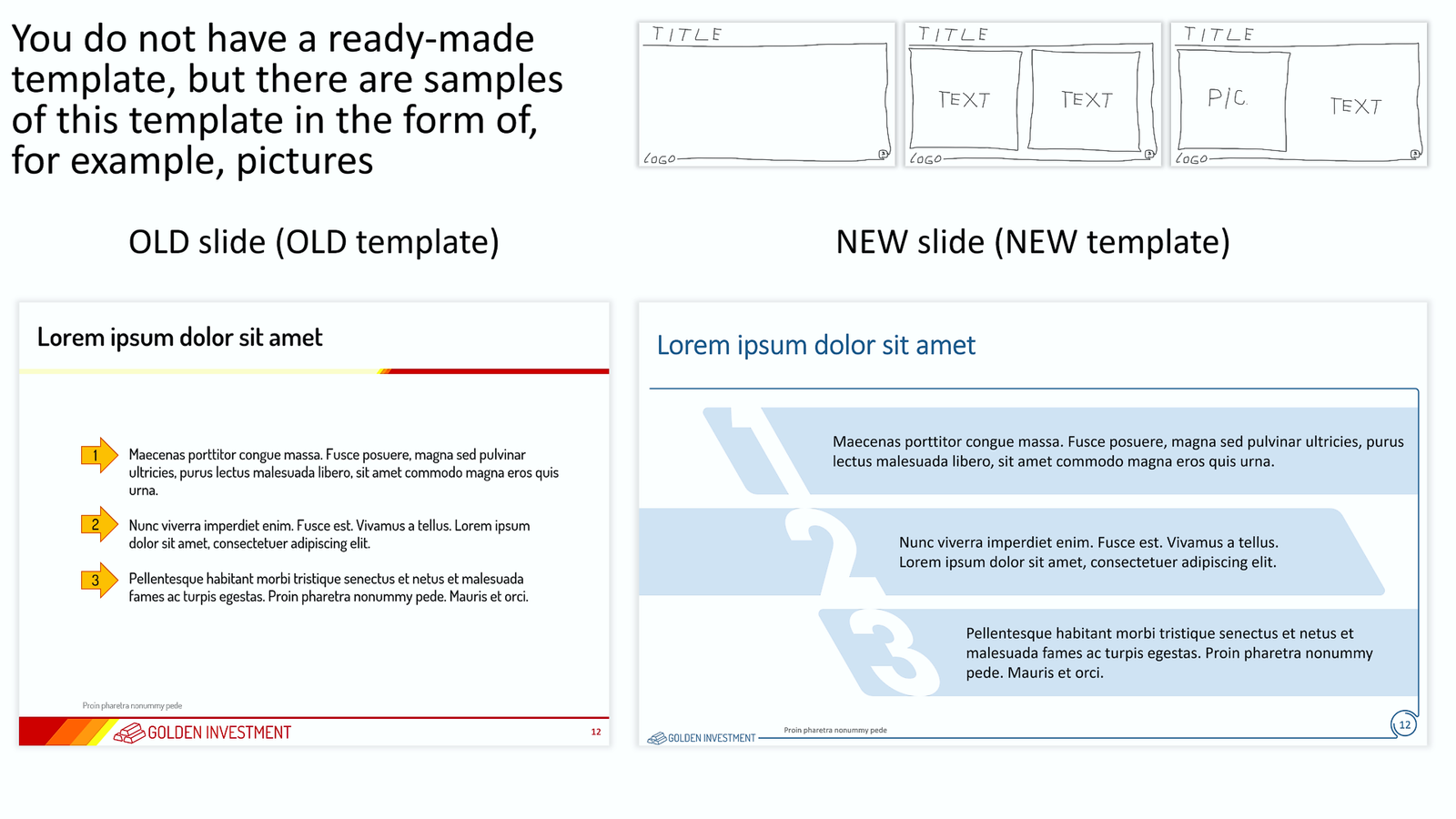
- You do not have a ready-made template in which you want to transfer your slides, but you have images of the template.
Note: A presentation that contains the target template can be used as a template.
Why might this be needed?
- If your company has undergone a rebranding and needs to transfer presentations made in the old template to a new template that was approved after the rebranding.
- If your contractor has created slides for you in a template that does not match the template you are using, these slides need to be transferred to your template.
- If your client requested slides from you in a specific template
- If you want your presentation to look new and have a new template for your presentation
- If you liked some beautiful template and want to use it, but you do not have the template itself, but only its images.
- ... and many other reasons.
How to do it?
There are several ways:
- Suppose the size (proportions) of the slides and the number, sequence, and location of placeholders match. In that case, such a transfer is easy: the slides are assigned a new template, and then only minor editing is required (alignment, font sizes, replacing colors outside the palette, etc.). Unfortunately, this is almost an unrealistic situation. Such a coincidence happens no more than once a year :-)
- If the size (proportions) of slides and/or the number, sequence, and location of placeholders do not match, then, for example, there are the following options:
- First way. The existing template is converted into a new template according to the sample. Placeholders and all graphical objects are replaced. Next, you need rather complicated editing of each slide.
- The second way. Based on the new template, slides are created and all objects from the original presentation are transferred to the new slides. At the same time, the corresponding editing of the properties of each object takes place. Some elements are assigned to the appropriate placeholders if necessary.
- ... other methods.
We reserve the choice of how to transfer slides from one template to another.
Another important note: if the original presentation used colors outside the template palette, then after transferring the slides to the new template, you must assign the appropriate color from the template palette to each object.
How to order this service
Select the option you need and place it in the shopping cart. Specify the number of slides to be transferred in the new template.
Please note that every 10 slides the price goes down. The more slides you order, the less will be the cost of one slide.
If you need to transfer more than 150 slides, then before placing an order, write to us at
inbox@needslide.com and we will offer a comfortable price for you.
Upload the presentation you want to transfer to the new template. If you have chosen the 2nd option of this service (if you do not have a ready-made template or a presentation containing it), then we will create a new template for you based on the samples (images) that you send us. Also download any additional materials if needed (images, fonts, etc.).
Describe your task in detail. Indicate all the important nuances and features.
Upload files formats
The format of the presentation you want to transfer to the new template is
PPTX.
Samples of the template when ordering the 2nd version of this service (you do not have a ready-made new template or presentation containing it) -
PPTX, PDF, JPG, PNG, BMP, TIFF, WMF, EMF, SVG, EPS, AI, CDR.
Font format, if required -
TTF, OTF. For best compatibility, we recommend using
TTF fonts.
Image format (illustrations), if required -
PDF, JPG, PNG, BMP, TIFF, WMF, EMF, SVG, EPS, AI, CDR.
If the format you need is not listed here, please contact us at
inbox@needslide.com, we may be able to help.
Features of this service
- The number of iterations is not limited. Each iteration is a new due date. If additional iteration is needed, then it may include only minor edits in the presentation, the link to which we sent you. Adding new files, and individual slides, and significantly changing the structure and/or design of already edited slides is a new task. We reserve the right to refuse to provide new iterations if we believe that the Customer is abusing his right to additional iterations.
- The deadline for the task is up to 20 slides every 24 hours. At the same time, we try to fulfill your order as quickly as possible, much faster than 24 hours. The speed of order execution depends on the number and complexity of the slides and our current busyness. If we did not send you a link to the finished file on time, then we will fully refund you the entire amount of the payment for this order.
- We do not edit/delete/add text on slides in any way. Only a small number of obvious grammatical errors may be corrected and only at our discretion.
- We do not change the fonts in the presentation unless you explicitly indicated the need to replace the fonts in the task description. If you indicated only the very need to replace the fonts, then by default we will replace the fonts in the presentation with the system fonts of our choice. You can specify specific system fonts or any other fonts. If you specify a non-system font, then you must also upload the font files that you want to use in the presentation. If you do not have the font files, then contact us at inbox@needslide.com, maybe we can help. All non-system fonts will be fully embedded in the presentation, which can significantly increase the presentation’s file size.
- Vector/raster images (illustrations) – we can edit images (illustrations) in your presentation of our choice unless you explicitly indicate otherwise in the description of the assignment. We do not add new images (illustrations) to the presentation unless you explicitly indicated this in the assignment description. In this case, you need to send us these images (illustrations) together with other files of the assignment with a detailed description of which image (illustration) to insert on which slide. Or you can independently insert images (illustrations) on the corresponding slides – we will edit and design them accordingly. If you do not have the necessary images (illustrations), then contact us at inbox@needslide.com, we may be able to help.
- Vector icons – we can add icons to slides at our discretion unless you explicitly indicated in the task description that icons cannot be added. If you want to add icons of a certain subject, please describe it in the task and/or attach samples of the necessary icons (raster or vector) to the task files. Or write to us inbox@needslide.com, we will help you find/draw any icons.
- Diagrams (charts) – please write in the description of the task whether it is possible to make diagrams (charts) non-editable (for example, convert a diagram into a vector object without the ability to edit data)? This is possible if you know for sure that the data in the chart will no longer change. Converting a diagram into a vector object in many cases gives you much more options in the design of the diagram. If you did not write anything in the task about diagrams (charts), then by default we will assume that diagrams (charts) should be left as is, i.e. with the ability to edit data.
- Templates – creating / editing templates is not included in this service. But we can, at our discretion, make minor adjustments to the templates if needed.
- Color Schemes – We do not create/edit color schemes as part of this service, but we reserve the right to make minor adjustments to color schemes if needed.
- Rendering complex diagrams, charts, maps, etc. – these works are not included in this service. If you require such services, then please refer to the relevant sections of our services or write to us about it at inbox@needslide.com.
- For all other questions, please contact inbox@needslide.com.
Confidentiality
We are committed to confidentiality. Under no circumstances do we show/transmit or in any other way share the materials of your task with third parties. After completing work on your task, all task materials are transferred to the archive and stored therein encrypted form without access to any networks (including the Internet). This is necessary if in the future you request any work with your materials. If you do not want the materials of your task to be stored in our archive, then indicate this in the description of the task. In this case, all materials of your task will be deleted (without the possibility of recovery) after the completion of the task. The link to the final file (s) of your assignment is valid for 7 days. After this period, the final file (s) of your task will be transferred to the archive or deleted (without the possibility of recovery) if you indicated this in the description of your task.
Refusal to perform the task
We reserve the right to refuse to perform the task if the task contains materials that are ethically unacceptable to us (discrimination on racial, ethnic, gender, religious and other grounds, etc.). In this case, we will fully refund you the amount of your payment for this task.
[/fusion_text][/fusion_builder_column][fusion_builder_column type="1_2" layout="1_2" align_self="auto" content_layout="column" align_content="flex-start" content_wrap="wrap" spacing="" center_content="no" link="" target="_self" min_height="" hide_on_mobile="small-visibility,medium-visibility,large-visibility" sticky_display="normal,sticky" class="" id="" type_medium="" type_small="" order_medium="0" order_small="0" dimension_spacing_medium="" dimension_spacing_small="" dimension_spacing="" dimension_margin_medium="" dimension_margin_small="" margin_top="" margin_bottom="" padding_medium="" padding_small="" padding_top="" padding_right="" padding_bottom="" padding_left="" hover_type="none" border_sizes="" border_color="" border_style="solid" border_radius="" box_shadow="no" dimension_box_shadow="" box_shadow_blur="0" box_shadow_spread="0" box_shadow_color="" box_shadow_style="" background_type="single" gradient_start_color="" gradient_end_color="" gradient_start_position="0" gradient_end_position="100" gradient_type="linear" radial_direction="center center" linear_angle="180" background_color="" background_image="" background_image_id="" background_position="left top" background_repeat="no-repeat" background_blend_mode="none" animation_type="" animation_direction="left" animation_speed="0.3" animation_offset="" filter_type="regular" filter_hue="0" filter_saturation="100" filter_brightness="100" filter_contrast="100" filter_invert="0" filter_sepia="0" filter_opacity="100" filter_blur="0" filter_hue_hover="0" filter_saturation_hover="100" filter_brightness_hover="100" filter_contrast_hover="100" filter_invert_hover="0" filter_sepia_hover="0" filter_opacity_hover="100" filter_blur_hover="0" last="true" border_position="all" first="false"][/fusion_builder_column][/fusion_builder_row][/fusion_builder_container]


 1814
1814

 1804
1804

 1799
1799

 1786
1786

 1781
1781

 1768
1768

 1763
1763

 1750
1750

 1745
1745

 1732
1732

 1727
1727

 1714
1714

 1709
1709
 00003704
 S-005-002

 2017
2017

 1959
1959

 1954
1954

 1944
1944

 1939
1939