
Showing all 3 results

 1847
Vector Flags and Flag Icons for PowerPoint
[fusion_builder_container type="flex" hundred_percent="no" hundred_percent_height="no" min_height="" hundred_percent_height_scroll="no" align_content="stretch" flex_align_items="flex-start" flex_justify_content="flex-start" flex_column_spacing="" hundred_percent_height_center_content="yes" equal_height_columns="no" container_tag="div" menu_anchor="" hide_on_mobile="small-visibility,medium-visibility,large-visibility" status="published" publish_date="" class="" id="" link_color="" link_hover_color="" border_sizes="" border_sizes_top="" border_sizes_right="" border_sizes_bottom="" border_sizes_left="" border_color="" border_style="solid" spacing_medium="" margin_top_medium="" margin_bottom_medium="" spacing_small="" margin_top_small="" margin_bottom_small="" margin_top="" margin_bottom="" padding_dimensions_medium="" padding_top_medium="" padding_right_medium="" padding_bottom_medium="" padding_left_medium="" padding_dimensions_small="" padding_top_small="" padding_right_small="" padding_bottom_small="" padding_left_small="" padding_top="" padding_right="" padding_bottom="" padding_left="" box_shadow="no" box_shadow_vertical="" box_shadow_horizontal="" box_shadow_blur="0" box_shadow_spread="0" box_shadow_color="" box_shadow_style="" z_index="" overflow="" gradient_start_color="" gradient_end_color="" gradient_start_position="0" gradient_end_position="100" gradient_type="linear" radial_direction="center center" linear_angle="180" background_color="" background_image="" background_position="center center" background_repeat="no-repeat" fade="no" background_parallax="none" enable_mobile="no" parallax_speed="0.3" background_blend_mode="none" video_mp4="" video_webm="" video_ogv="" video_url="" video_aspect_ratio="16:9" video_loop="yes" video_mute="yes" video_preview_image="" absolute="off" absolute_devices="small,medium,large" sticky="off" sticky_devices="small-visibility,medium-visibility,large-visibility" sticky_background_color="" sticky_height="" sticky_offset="" sticky_transition_offset="0" scroll_offset="0" animation_type="" animation_direction="left" animation_speed="0.3" animation_offset="" filter_hue="0" filter_saturation="100" filter_brightness="100" filter_contrast="100" filter_invert="0" filter_sepia="0" filter_opacity="100" filter_blur="0" filter_hue_hover="0" filter_saturation_hover="100" filter_brightness_hover="100" filter_contrast_hover="100" filter_invert_hover="0" filter_sepia_hover="0" filter_opacity_hover="100" filter_blur_hover="0"][fusion_builder_row][fusion_builder_column type="1_2" layout="2_5" align_self="auto" content_layout="column" align_content="flex-start" content_wrap="wrap" spacing="" center_content="no" link="" target="_self" min_height="" hide_on_mobile="small-visibility,medium-visibility,large-visibility" sticky_display="normal,sticky" class="" id="" type_medium="" type_small="" order_medium="0" order_small="0" dimension_spacing_medium="" dimension_spacing_small="" dimension_spacing="" dimension_margin_medium="" dimension_margin_small="" margin_top="" margin_bottom="" padding_medium="" padding_small="" padding_top="" padding_right="" padding_bottom="" padding_left="" hover_type="none" border_sizes="" border_color="" border_style="solid" border_radius="" box_shadow="no" dimension_box_shadow="" box_shadow_blur="0" box_shadow_spread="0" box_shadow_color="" box_shadow_style="" background_type="single" gradient_start_color="" gradient_end_color="" gradient_start_position="0" gradient_end_position="100" gradient_type="linear" radial_direction="center center" linear_angle="180" background_color="" background_image="" background_image_id="" background_position="left top" background_repeat="no-repeat" background_blend_mode="none" animation_type="" animation_direction="left" animation_speed="0.3" animation_offset="" filter_type="regular" filter_hue="0" filter_saturation="100" filter_brightness="100" filter_contrast="100" filter_invert="0" filter_sepia="0" filter_opacity="100" filter_blur="0" filter_hue_hover="0" filter_saturation_hover="100" filter_brightness_hover="100" filter_contrast_hover="100" filter_invert_hover="0" filter_sepia_hover="0" filter_opacity_hover="100" filter_blur_hover="0" last="false" border_position="all" first="true" spacing_right=""][fusion_text columns="" column_min_width="" column_spacing="" rule_style="default" rule_size="" rule_color="" content_alignment_medium="" content_alignment_small="" content_alignment="" hide_on_mobile="small-visibility,medium-visibility,large-visibility" sticky_display="normal,sticky" class="" id="" font_size="" fusion_font_family_text_font="" fusion_font_variant_text_font="" line_height="" letter_spacing="" text_color="" animation_type="" animation_direction="left" animation_speed="0.3" animation_offset=""] Short description Introducing Flag Icons for PowerPoint. It's no exaggeration to say that these are the best Flag Icons for PowerPoint you can find.- Vector and Raster Flags Icons
- Vector flags
- Six options for the shape of icons
- Scaling without distortion
- Each icon has a name
- Optimized for PowerPoint use
These products contain one or more of four types of objects:Flag Icons 
Flags and Flag Icons 
“Flag Icon” Tool 
And the objects themselves are formed into eight types of sets, formed depending on the type of object and the shape of the icon:Vector Flag Icons 
Raster Flag Icons 
Vector Flags 
“Flag Icon” Tool (consists of many different vector objects) 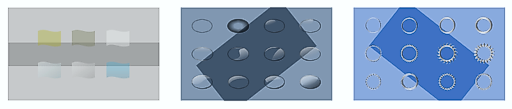
[/fusion_text][fusion_text columns="" column_min_width="" column_spacing="" rule_style="default" rule_size="" rule_color="" content_alignment_medium="" content_alignment_small="" content_alignment="" hide_on_mobile="small-visibility,medium-visibility,large-visibility" sticky_display="normal,sticky" class="" id="" font_size="" fusion_font_family_text_font="" fusion_font_variant_text_font="" line_height="" letter_spacing="" text_color="" animation_type="" animation_direction="left" animation_speed="0.3" animation_offset=""] Vector Flag IconsCircle icon 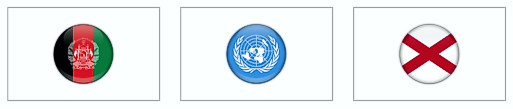
Square Icon 
Ellipse Icon 
Rectangle Icon 
Flag01 Icon 
Flag02 Icon 
Circle + Square + Ellipse + Rectangle + Flag01 + Flag02 Icons 
No flag icons (only flags)  Vector Flag Icons are carefully vector-drawn images. The colors of the icons are fully consistent with the colors of the flags. When creating icons, the priority was not to preserve proportions but to recognize the flags. Therefore, all important elements of the flag are present in the icon, even when the proportions of the icon's shape create a restriction on the display of all the main elements of the flag.
Using vector icons in a presentation has some advantages. For example, reducing the file size in most cases. If the vector icon is very complex (consists many of objects), then using a raster icon can reduce the file size. But in most cases, when a vector icon is relatively simple, it will be preferable to use a vector icon. In addition, all vector icons can be scaled without loss of quality.
Raster Flag Icons
 Raster Flags Icons are based on vector Flags Icons. Outwardly, they are no different. In PowerPoint, raster icons may appear smoother than vector icons in slide edit mode. But in Slide Show mode, both vector and bitmap icons look the same.
Raster Icons of Flags were originally made quite large - approximately 1/2 of the height of the A4 slide. This is done to minimize the loss of quality when scaling. Bitmap icons are presented as PNG files with a transparent background.
[/fusion_text][fusion_accordion type="" boxed_mode="" border_size="1" border_color="" background_color="" hover_color="" divider_line="" title_font_size="" icon_size="" icon_color="" icon_boxed_mode="" icon_box_color="" icon_alignment="" toggle_hover_accent_color="" hide_on_mobile="small-visibility,medium-visibility,large-visibility" class="" id=""][fusion_toggle title="How to insert a Raster Flag Icon into a presentation" open="no" class="" id=""]
- On the ribbon, select the Insert tab
- Click on the Pictures icon
 3. Go to the folder where you unzipped the downloaded set of Flags Icons and select the PNG file you need. By pressing and holding the Shift key, you can select several icons in a row. Or by pressing and holding down the Ctrl key, you can select several icons in any order.
[/fusion_toggle][/fusion_accordion][fusion_text columns="" column_min_width="" column_spacing="" rule_style="default" rule_size="" rule_color="" content_alignment_medium="" content_alignment_small="" content_alignment="" hide_on_mobile="small-visibility,medium-visibility,large-visibility" sticky_display="normal,sticky" class="" id="" font_size="" fusion_font_family_text_font="" fusion_font_variant_text_font="" line_height="" letter_spacing="" text_color="" animation_type="" animation_direction="left" animation_speed="0.3" animation_offset=""]
Vector Flags
Vector flags are created in full accordance with the official flag parameters. The actual proportions of the flags are strictly observed. All colors also strictly correspond to the official colors of the flags. Vector flags can be scaled without loss of quality.
 Vector Flags and Flag Icons
 Vector Flags and Flag Icons in one product are the same Vector Flags and Vector Flag Icons but presented together in one product. Their properties, capabilities, and application are no different from Vector Flags separately and from Vector Flag Icons
separately.
"Flag Icon" Tool
"Flag Icon" Tool - a set of graphic materials for self-creation of your own vector Flag Icons in PowerPoint.
Create your own vector Flag Icons!
This product has all the necessary components (layers) to create your Flag Icons: Basis (flat Flag Icon), Substrate, Color Filter, Glare, Frame, and Shadow. Use one to six components (layers) to create your own vector Flag Icons for PowerPoint. The components included in the Tool allow you to create up to 200,000 vector combinations of Flag Icons. You can also create any icons - use any other icons (including vector ones) or images instead of flat Flag Icon.
 [/fusion_text][fusion_accordion type="" boxed_mode="" border_size="1" border_color="" background_color="" hover_color="" divider_line="" title_font_size="" icon_size="" icon_color="" icon_boxed_mode="" icon_box_color="" icon_alignment="" toggle_hover_accent_color="" hide_on_mobile="small-visibility,medium-visibility,large-visibility" class="" id=""][fusion_toggle title="What's in each Flag Icon Tool?" open="no" class="" id=""]
Each set of the "Flag Icon" Tool contains:
- 12 Substrates
- 6 Color Filters
- 12 Glares
- 12 Frames
- 12 Shadows
- and a set of flat Flag Icons
[/fusion_toggle][/fusion_accordion][fusion_text columns="" column_min_width="" column_spacing="" rule_style="default" rule_size="" rule_color="" content_alignment_medium="" content_alignment_small="" content_alignment="" hide_on_mobile="small-visibility,medium-visibility,large-visibility" sticky_display="normal,sticky" class="" id="" font_size="" fusion_font_family_text_font="" fusion_font_variant_text_font="" line_height="" letter_spacing="" text_color="" animation_type="" animation_direction="left" animation_speed="0.3" animation_offset=""]
Icon shape variants
At the moment, there are 6 options for the shape of the icons:
[/fusion_text][fusion_text columns="" column_min_width="" column_spacing="" rule_style="default" rule_size="" rule_color="" content_alignment_medium="" content_alignment_small="" content_alignment="" hide_on_mobile="small-visibility,medium-visibility,large-visibility" sticky_display="normal,sticky" class="" id="" font_size="" fusion_font_family_text_font="" fusion_font_variant_text_font="" line_height="" letter_spacing="" text_color="" animation_type="" animation_direction="left" animation_speed="0.3" animation_offset=""] Optimized for PowerPoint Each Flag Vector Icon, as well as each Flag Vector, is optimized for easy use in PowerPoint:Circle icon 
Square Icon 
Ellipse Icon 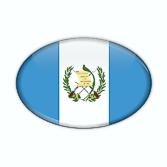
Rectangle Icon 
Flag01 Icon 
Flag02 Icon 
- All vector objects have been simplified without sacrificing quality - the number of points in curves has been reduced where possible.
- The number of objects has been reduced due to the fact that objects with the same properties are combined into one object. A large number of objects can slower down PowerPoint's responsiveness to user input much more than the complexity of the objects. Therefore, where possible, the number of objects has been reduced without compromising quality, namely by combining objects with the same properties.
 Scaling without distortion
PowerPoint does not scale outlines (lines) when scaling objects. Therefore, for example, if the object contains lines (contours), then with a strong decrease, if the contours (lines) are wide enough, then the object may be distorted. See an example of such a distortion:
 Therefore, all of our Flag Icons are made in such a way that they do not contain any lines (outlines). All outlines are replaced objects without lines. And now you can scale the Flags Icons without fear of getting distorted.
 [/fusion_text][fusion_text columns="" column_min_width="" column_spacing="" rule_style="default" rule_size="" rule_color="" content_alignment_medium="" content_alignment_small="" content_alignment="" hide_on_mobile="small-visibility,medium-visibility,large-visibility" sticky_display="normal,sticky" class="" id="" font_size="" fusion_font_family_text_font="" fusion_font_variant_text_font="" line_height="" letter_spacing="" text_color="" animation_type="" animation_direction="left" animation_speed="0.3" animation_offset=""]
Basic, Standard, and Premium
In the Basic version, there are sets of Flag Icons from all over the world.
 In the Standard version, 18 icons of international organizations and unions have been added to the Icons of the flags of the whole world.
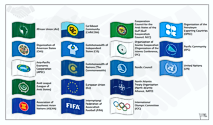 In the Premium version, 52 icons of the US states have been added to the icons of the flags of the whole world and 18 icons of international organizations and unions.
 Icon names
All icons have names - you can see them in the Selection Pane. It is easy to find the Flag Icon of the required country by the name of the icon.
 Please note that if you ungroup an icon, its name will be lost. Therefore, before ungrouping the icon, you need to make a copy of it.
Use with other NeedSlide products
Currently, all Flag Icon sets cover the entire world (regions and countries will be presented later) and are designed so that they can be used in conjunction with The Best World Map for PowerPoint. Each variant of the Flag Icon set corresponds to a specific variant of The Best World Map for PowerPoint according to the composition of the countries represented. And vice versa. You can also use Flag Icons in conjunction with any other NeedSlide product.
 You will win if you purchase a set of Flags Icons and The Best World Map for PowerPoint.
Coats of arms?
Will there be coats of arms of countries in our catalog? Yes, they will. And at the moment you have the opportunity to get the coats of arms (seals, emblems) of only some countries - countries that have a coat of arms on the flag. Due to the fact that the Flag Icons are made of vector objects, you can ungroup the icon and extract only the coat of arms from it.
 [/fusion_text][fusion_accordion type="" boxed_mode="" border_size="1" border_color="" background_color="" hover_color="" divider_line="" title_font_size="" icon_size="" icon_color="" icon_boxed_mode="" icon_box_color="" icon_alignment="" toggle_hover_accent_color="" hide_on_mobile="small-visibility,medium-visibility,large-visibility" class="" id=""][fusion_toggle title="List of countries with a coat of arms on the flag" open="no" class="" id=""]
[/fusion_toggle][fusion_toggle title="List of all countries in our icon catalog" open="no" class="" id=""]Andorra Ethiopia Paraguay Anguilla Falkland Islands Peru Belize French Polynesia Pitcairn Islands Bermuda Guam Portugal British Virgin Islands Guatemala San Marino Brunei Haiti Sint Maarten Cayman Islands Iran Slovakia Costa Rica Mexico Slovenia Croatia Moldova South Georgia and the South Sandwich Islands Dominican Republic Montenegro Spain Ecuador Montserrat Venezuela El Salvador Nicaragua Equatorial Guinea Oman
[/fusion_toggle][/fusion_accordion][fusion_text columns="" column_min_width="" column_spacing="" rule_style="default" rule_size="" rule_color="" content_alignment_medium="" content_alignment_small="" content_alignment="" hide_on_mobile="small-visibility,medium-visibility,large-visibility" sticky_display="normal,sticky" class="" id="" font_size="" fusion_font_family_text_font="" fusion_font_variant_text_font="" line_height="" letter_spacing="" text_color="" animation_type="" animation_direction="left" animation_speed="0.3" animation_offset=""] How to choose the Flag Icons Set on NeedSlide? [/fusion_text][fusion_youtube id="uvyfSABS-xM" alignment="" width="" height="" autoplay="false" api_params="" hide_on_mobile="small-visibility,medium-visibility,large-visibility" class="" css_id="" /][/fusion_builder_column][fusion_builder_column type="1_2" layout="3_5" align_self="auto" content_layout="column" align_content="flex-start" content_wrap="wrap" spacing="" center_content="no" link="" target="_self" min_height="" hide_on_mobile="small-visibility,medium-visibility,large-visibility" sticky_display="normal,sticky" class="" id="" type_medium="" type_small="" order_medium="0" order_small="0" dimension_spacing_medium="" dimension_spacing_small="" dimension_spacing="" dimension_margin_medium="" dimension_margin_small="" margin_top="" margin_bottom="" padding_medium="" padding_small="" padding_top="" padding_right="" padding_bottom="" padding_left="" hover_type="none" border_sizes="" border_color="" border_style="solid" border_radius="" box_shadow="no" dimension_box_shadow="" box_shadow_blur="0" box_shadow_spread="0" box_shadow_color="" box_shadow_style="" background_type="single" gradient_start_color="" gradient_end_color="" gradient_start_position="0" gradient_end_position="100" gradient_type="linear" radial_direction="center center" linear_angle="180" background_color="" background_image="" background_image_id="" background_position="left top" background_repeat="no-repeat" background_blend_mode="none" animation_type="" animation_direction="left" animation_speed="0.3" animation_offset="" filter_type="regular" filter_hue="0" filter_saturation="100" filter_brightness="100" filter_contrast="100" filter_invert="0" filter_sepia="0" filter_opacity="100" filter_blur="0" filter_hue_hover="0" filter_saturation_hover="100" filter_brightness_hover="100" filter_contrast_hover="100" filter_invert_hover="0" filter_sepia_hover="0" filter_opacity_hover="100" filter_blur_hover="0" last="true" border_position="all" first="false"][/fusion_builder_column][/fusion_builder_row][/fusion_builder_container]1 Afghanistan 2 Alaska, United States of America 3 Albania 4 Algeria 5 American Samoa 6 Andorra 7 Angola 8 Anguilla 9 Antarctica 10 Antigua and Barbuda 11 Argentina 12 Armenia 13 Aruba 14 Australia 15 Austria 16 Azerbaijan 17 Azores 18 Bahamas 19 Bahrain 20 Bangladesh 21 Barbados 22 Belarus 23 Belgium 24 Belize 25 Benin 26 Bermuda 27 Bhutan 28 Bolivia 29 Bonaire 30 Bosnia and Herzegovina 31 Botswana 32 Brazil 33 British Virgin Islands 34 Brunei 35 Bulgaria 36 Burkina Faso 37 Burundi 38 Cambodia 39 Cameroon 40 Canada 41 Canary Islands 42 Cape Verde 43 Cayman Islands 44 Central African Republic 45 Chad 46 Chile 47 China 48 Colombia 49 Comoros 50 Democratic Republic of the Congo 51 Republic of the Congo 52 Cook Islands 53 Costa Rica 54 Croatia 55 Cuba 56 Curaçao 57 Cyprus 58 Czech Republic 59 Denmark 60 Djibouti 61 Dominica 62 Dominican Republic 63 East Timor 64 Ecuador 65 Egypt 66 El Salvador 67 Equatorial Guinea 68 Eritrea 69 Estonia 70 Eswatini 71 Ethiopia 72 Falkland Islands 73 Faroe Islands 74 Fiji 75 Finland 76 France 77 French Guiana 78 French Polynesia 79 French Southern and Antarctic Lands 80 Gabon 81 Galápagos Islands, Ecuador 82 Gambia 83 Georgia 84 Germany 85 Ghana 86 Gibraltar 87 Greece 88 Greenland 89 Grenada 90 Guadeloupe 91 Guam 92 Guatemala 93 Guernsey 94 Guinea 95 Guinea-Bissau 96 Guyana 97 Haiti 98 Hawaii, United States of America 99 Honduras 100 Hong Kong 101 Hungary 102 Iceland 103 India 104 Indonesia 105 Iran 106 Iraq 107 Ireland 108 Isle of Man 109 Israel 110 Italy 111 Ivory Coast 112 Jamaica 113 Jan Mayen, Norway 114 Japan 115 Jersey 116 Jordan 117 Kazakhstan 118 Kenya 119 Kiribati 120 Kosovo 121 Kuwait 122 Kyrgyzstan 123 Laos 124 Latvia 125 Lebanon 126 Lesotho 127 Liberia 128 Libya 129 Liechtenstein 130 Lithuania 131 Luxembourg 132 Macau 133 Madagascar 134 Madeira 135 Malawi 136 Malaysia 137 Maldives 138 Mali 139 Malta 140 Marshall Islands 141 Martinique 142 Mauritania 143 Mauritius 144 Mayotte 145 Mexico 146 Micronesia 147 Moldova 148 Monaco 149 Mongolia 150 Montenegro 151 Montserrat 152 Morocco 153 Mozambique 154 Myanmar 155 Namibia 156 Nauru 157 Nepal 158 Netherlands 159 New Caledonia 160 New Zealand 161 Nicaragua 162 Niger 163 Nigeria 164 Niue 165 Norfolk Island 166 Northern Mariana Islands 167 North Korea 168 North Macedonia 169 Norway 170 Oman 171 Pakistan 172 Palau 173 Palestine 174 Panama 175 Papua New Guinea 176 Paraguay 177 Peru 178 Philippines 179 Pitcairn Islands 180 Poland 181 Portugal 182 Puerto Rico 183 Qatar 184 Réunion 185 Romania 186 Russia 187 Rwanda 188 Saint Barthélemy 189 Saint Helena, Ascension and Tristan da Cunha 190 Saint Kitts and Nevis 191 Saint Lucia 192 Saint Martin 193 Saint Pierre and Miquelon 194 Saint Vincent and the Grenadines 195 Samoa 196 San Marino 197 São Tomé and Príncipe 198 Saudi Arabia 199 Senegal 200 Serbia 201 Seychelles 202 Sierra Leone 203 Singapore 204 Sint Maarten 205 Slovakia 206 Slovenia 207 Solomon Islands 208 Somalia 209 South Africa 210 South Georgia and the South Sandwich Islands 211 South Korea 212 South Sudan 213 Spain 214 Sri Lanka 215 Sudan 216 Suriname 217 Svalbard, Norway 218 Sweden 219 Switzerland 220 Syria 221 Taiwan 222 Tajikistan 223 Tanzania 224 Thailand 225 Togo 226 Tokelau 227 Tonga 228 Trinidad and Tobago 229 Tunisia 230 Turkey 231 Turkmenistan 232 Turks and Caicos Islands 233 Tuvalu 234 Uganda 235 Ukraine 236 United Arab Emirates 237 United Kingdom 238 United States of America 239 United States Virgin Islands 240 Uruguay 241 Uzbekistan 242 Vanuatu 243 Vatican City 244 Venezuela 245 Vietnam 246 Wallis and Futuna 247 Western Sahara 248 Yemen 249 Zambia 250 Zimbabwe
11,00 $Product variant: Premium Flag Icons set: Circle Icon Flag Icons type: Vector Number of countries (entities): 164 (for the whole world) Number of Flag Icons: 234 
 1919
Vector Flags and Flag Icons for PowerPoint
[fusion_builder_container type="flex" hundred_percent="no" hundred_percent_height="no" min_height="" hundred_percent_height_scroll="no" align_content="stretch" flex_align_items="flex-start" flex_justify_content="flex-start" flex_column_spacing="" hundred_percent_height_center_content="yes" equal_height_columns="no" container_tag="div" menu_anchor="" hide_on_mobile="small-visibility,medium-visibility,large-visibility" status="published" publish_date="" class="" id="" link_color="" link_hover_color="" border_sizes="" border_sizes_top="" border_sizes_right="" border_sizes_bottom="" border_sizes_left="" border_color="" border_style="solid" spacing_medium="" margin_top_medium="" margin_bottom_medium="" spacing_small="" margin_top_small="" margin_bottom_small="" margin_top="" margin_bottom="" padding_dimensions_medium="" padding_top_medium="" padding_right_medium="" padding_bottom_medium="" padding_left_medium="" padding_dimensions_small="" padding_top_small="" padding_right_small="" padding_bottom_small="" padding_left_small="" padding_top="" padding_right="" padding_bottom="" padding_left="" box_shadow="no" box_shadow_vertical="" box_shadow_horizontal="" box_shadow_blur="0" box_shadow_spread="0" box_shadow_color="" box_shadow_style="" z_index="" overflow="" gradient_start_color="" gradient_end_color="" gradient_start_position="0" gradient_end_position="100" gradient_type="linear" radial_direction="center center" linear_angle="180" background_color="" background_image="" background_position="center center" background_repeat="no-repeat" fade="no" background_parallax="none" enable_mobile="no" parallax_speed="0.3" background_blend_mode="none" video_mp4="" video_webm="" video_ogv="" video_url="" video_aspect_ratio="16:9" video_loop="yes" video_mute="yes" video_preview_image="" absolute="off" absolute_devices="small,medium,large" sticky="off" sticky_devices="small-visibility,medium-visibility,large-visibility" sticky_background_color="" sticky_height="" sticky_offset="" sticky_transition_offset="0" scroll_offset="0" animation_type="" animation_direction="left" animation_speed="0.3" animation_offset="" filter_hue="0" filter_saturation="100" filter_brightness="100" filter_contrast="100" filter_invert="0" filter_sepia="0" filter_opacity="100" filter_blur="0" filter_hue_hover="0" filter_saturation_hover="100" filter_brightness_hover="100" filter_contrast_hover="100" filter_invert_hover="0" filter_sepia_hover="0" filter_opacity_hover="100" filter_blur_hover="0"][fusion_builder_row][fusion_builder_column type="1_2" layout="2_5" align_self="auto" content_layout="column" align_content="flex-start" content_wrap="wrap" spacing="" center_content="no" link="" target="_self" min_height="" hide_on_mobile="small-visibility,medium-visibility,large-visibility" sticky_display="normal,sticky" class="" id="" type_medium="" type_small="" order_medium="0" order_small="0" dimension_spacing_medium="" dimension_spacing_small="" dimension_spacing="" dimension_margin_medium="" dimension_margin_small="" margin_top="" margin_bottom="" padding_medium="" padding_small="" padding_top="" padding_right="" padding_bottom="" padding_left="" hover_type="none" border_sizes="" border_color="" border_style="solid" border_radius="" box_shadow="no" dimension_box_shadow="" box_shadow_blur="0" box_shadow_spread="0" box_shadow_color="" box_shadow_style="" background_type="single" gradient_start_color="" gradient_end_color="" gradient_start_position="0" gradient_end_position="100" gradient_type="linear" radial_direction="center center" linear_angle="180" background_color="" background_image="" background_image_id="" background_position="left top" background_repeat="no-repeat" background_blend_mode="none" animation_type="" animation_direction="left" animation_speed="0.3" animation_offset="" filter_type="regular" filter_hue="0" filter_saturation="100" filter_brightness="100" filter_contrast="100" filter_invert="0" filter_sepia="0" filter_opacity="100" filter_blur="0" filter_hue_hover="0" filter_saturation_hover="100" filter_brightness_hover="100" filter_contrast_hover="100" filter_invert_hover="0" filter_sepia_hover="0" filter_opacity_hover="100" filter_blur_hover="0" last="false" border_position="all" first="true" spacing_right=""][fusion_text columns="" column_min_width="" column_spacing="" rule_style="default" rule_size="" rule_color="" content_alignment_medium="" content_alignment_small="" content_alignment="" hide_on_mobile="small-visibility,medium-visibility,large-visibility" sticky_display="normal,sticky" class="" id="" font_size="" fusion_font_family_text_font="" fusion_font_variant_text_font="" line_height="" letter_spacing="" text_color="" animation_type="" animation_direction="left" animation_speed="0.3" animation_offset=""] Short description Introducing Flag Icons for PowerPoint. It's no exaggeration to say that these are the best Flag Icons for PowerPoint you can find.- Vector and Raster Flags Icons
- Vector flags
- Six options for the shape of icons
- Scaling without distortion
- Each icon has a name
- Optimized for PowerPoint use
These products contain one or more of four types of objects:Flag Icons Flags and Flag Icons “Flag Icon” Tool
And the objects themselves are formed into eight types of sets, formed depending on the type of object and the shape of the icon:Vector Flag Icons Raster Flag Icons Vector Flags “Flag Icon” Tool (consists of many different vector objects)
[/fusion_text][fusion_text columns="" column_min_width="" column_spacing="" rule_style="default" rule_size="" rule_color="" content_alignment_medium="" content_alignment_small="" content_alignment="" hide_on_mobile="small-visibility,medium-visibility,large-visibility" sticky_display="normal,sticky" class="" id="" font_size="" fusion_font_family_text_font="" fusion_font_variant_text_font="" line_height="" letter_spacing="" text_color="" animation_type="" animation_direction="left" animation_speed="0.3" animation_offset=""] Vector Flag IconsCircle icon Square Icon Ellipse Icon Rectangle Icon Flag01 Icon Flag02 Icon Circle + Square + Ellipse + Rectangle + Flag01 + Flag02 Icons No flag icons (only flags) Vector Flag Icons are carefully vector-drawn images. The colors of the icons are fully consistent with the colors of the flags. When creating icons, the priority was not to preserve proportions but to recognize the flags. Therefore, all important elements of the flag are present in the icon, even when the proportions of the icon's shape create a restriction on the display of all the main elements of the flag.
Using vector icons in a presentation has some advantages. For example, reducing the file size in most cases. If the vector icon is very complex (consists many of objects), then using a raster icon can reduce the file size. But in most cases, when a vector icon is relatively simple, it will be preferable to use a vector icon. In addition, all vector icons can be scaled without loss of quality.
Raster Flag Icons
Raster Flags Icons are based on vector Flags Icons. Outwardly, they are no different. In PowerPoint, raster icons may appear smoother than vector icons in slide edit mode. But in Slide Show mode, both vector and bitmap icons look the same.
Raster Icons of Flags were originally made quite large - approximately 1/2 of the height of the A4 slide. This is done to minimize the loss of quality when scaling. Bitmap icons are presented as PNG files with a transparent background.
[/fusion_text][fusion_accordion type="" boxed_mode="" border_size="1" border_color="" background_color="" hover_color="" divider_line="" title_font_size="" icon_size="" icon_color="" icon_boxed_mode="" icon_box_color="" icon_alignment="" toggle_hover_accent_color="" hide_on_mobile="small-visibility,medium-visibility,large-visibility" class="" id=""][fusion_toggle title="How to insert a Raster Flag Icon into a presentation" open="no" class="" id=""]- On the ribbon, select the Insert tab
- Click on the Pictures icon
3. Go to the folder where you unzipped the downloaded set of Flags Icons and select the PNG file you need. By pressing and holding the Shift key, you can select several icons in a row. Or by pressing and holding down the Ctrl key, you can select several icons in any order.
[/fusion_toggle][/fusion_accordion][fusion_text columns="" column_min_width="" column_spacing="" rule_style="default" rule_size="" rule_color="" content_alignment_medium="" content_alignment_small="" content_alignment="" hide_on_mobile="small-visibility,medium-visibility,large-visibility" sticky_display="normal,sticky" class="" id="" font_size="" fusion_font_family_text_font="" fusion_font_variant_text_font="" line_height="" letter_spacing="" text_color="" animation_type="" animation_direction="left" animation_speed="0.3" animation_offset=""]
Vector Flags
Vector flags are created in full accordance with the official flag parameters. The actual proportions of the flags are strictly observed. All colors also strictly correspond to the official colors of the flags. Vector flags can be scaled without loss of quality.
Vector Flags and Flag Icons
Vector Flags and Flag Icons in one product are the same Vector Flags and Vector Flag Icons but presented together in one product. Their properties, capabilities, and application are no different from Vector Flags separately and from Vector Flag Icons
separately.
"Flag Icon" Tool
"Flag Icon" Tool - a set of graphic materials for self-creation of your own vector Flag Icons in PowerPoint.
Create your own vector Flag Icons!
This product has all the necessary components (layers) to create your Flag Icons: Basis (flat Flag Icon), Substrate, Color Filter, Glare, Frame, and Shadow. Use one to six components (layers) to create your own vector Flag Icons for PowerPoint. The components included in the Tool allow you to create up to 200,000 vector combinations of Flag Icons. You can also create any icons - use any other icons (including vector ones) or images instead of flat Flag Icon.
[/fusion_text][fusion_accordion type="" boxed_mode="" border_size="1" border_color="" background_color="" hover_color="" divider_line="" title_font_size="" icon_size="" icon_color="" icon_boxed_mode="" icon_box_color="" icon_alignment="" toggle_hover_accent_color="" hide_on_mobile="small-visibility,medium-visibility,large-visibility" class="" id=""][fusion_toggle title="What's in each Flag Icon Tool?" open="no" class="" id=""]
Each set of the "Flag Icon" Tool contains:- 12 Substrates
- 6 Color Filters
- 12 Glares
- 12 Frames
- 12 Shadows
- and a set of flat Flag Icons
[/fusion_toggle][/fusion_accordion][fusion_text columns="" column_min_width="" column_spacing="" rule_style="default" rule_size="" rule_color="" content_alignment_medium="" content_alignment_small="" content_alignment="" hide_on_mobile="small-visibility,medium-visibility,large-visibility" sticky_display="normal,sticky" class="" id="" font_size="" fusion_font_family_text_font="" fusion_font_variant_text_font="" line_height="" letter_spacing="" text_color="" animation_type="" animation_direction="left" animation_speed="0.3" animation_offset=""]
Icon shape variants
At the moment, there are 6 options for the shape of the icons:
[/fusion_text][fusion_text columns="" column_min_width="" column_spacing="" rule_style="default" rule_size="" rule_color="" content_alignment_medium="" content_alignment_small="" content_alignment="" hide_on_mobile="small-visibility,medium-visibility,large-visibility" sticky_display="normal,sticky" class="" id="" font_size="" fusion_font_family_text_font="" fusion_font_variant_text_font="" line_height="" letter_spacing="" text_color="" animation_type="" animation_direction="left" animation_speed="0.3" animation_offset=""] Optimized for PowerPoint Each Flag Vector Icon, as well as each Flag Vector, is optimized for easy use in PowerPoint:Circle icon Square Icon Ellipse Icon Rectangle Icon Flag01 Icon Flag02 Icon - All vector objects have been simplified without sacrificing quality - the number of points in curves has been reduced where possible.
- The number of objects has been reduced due to the fact that objects with the same properties are combined into one object. A large number of objects can slower down PowerPoint's responsiveness to user input much more than the complexity of the objects. Therefore, where possible, the number of objects has been reduced without compromising quality, namely by combining objects with the same properties.
Scaling without distortion
PowerPoint does not scale outlines (lines) when scaling objects. Therefore, for example, if the object contains lines (contours), then with a strong decrease, if the contours (lines) are wide enough, then the object may be distorted. See an example of such a distortion:
Therefore, all of our Flag Icons are made in such a way that they do not contain any lines (outlines). All outlines are replaced objects without lines. And now you can scale the Flags Icons without fear of getting distorted.
[/fusion_text][fusion_text columns="" column_min_width="" column_spacing="" rule_style="default" rule_size="" rule_color="" content_alignment_medium="" content_alignment_small="" content_alignment="" hide_on_mobile="small-visibility,medium-visibility,large-visibility" sticky_display="normal,sticky" class="" id="" font_size="" fusion_font_family_text_font="" fusion_font_variant_text_font="" line_height="" letter_spacing="" text_color="" animation_type="" animation_direction="left" animation_speed="0.3" animation_offset=""]
Basic, Standard, and Premium
In the Basic version, there are sets of Flag Icons from all over the world.
In the Standard version, 18 icons of international organizations and unions have been added to the Icons of the flags of the whole world.
In the Premium version, 52 icons of the US states have been added to the icons of the flags of the whole world and 18 icons of international organizations and unions.
Icon names
All icons have names - you can see them in the Selection Pane. It is easy to find the Flag Icon of the required country by the name of the icon.
Please note that if you ungroup an icon, its name will be lost. Therefore, before ungrouping the icon, you need to make a copy of it.
Use with other NeedSlide products
Currently, all Flag Icon sets cover the entire world (regions and countries will be presented later) and are designed so that they can be used in conjunction with The Best World Map for PowerPoint. Each variant of the Flag Icon set corresponds to a specific variant of The Best World Map for PowerPoint according to the composition of the countries represented. And vice versa. You can also use Flag Icons in conjunction with any other NeedSlide product.
You will win if you purchase a set of Flags Icons and The Best World Map for PowerPoint.
Coats of arms?
Will there be coats of arms of countries in our catalog? Yes, they will. And at the moment you have the opportunity to get the coats of arms (seals, emblems) of only some countries - countries that have a coat of arms on the flag. Due to the fact that the Flag Icons are made of vector objects, you can ungroup the icon and extract only the coat of arms from it.
[/fusion_text][fusion_accordion type="" boxed_mode="" border_size="1" border_color="" background_color="" hover_color="" divider_line="" title_font_size="" icon_size="" icon_color="" icon_boxed_mode="" icon_box_color="" icon_alignment="" toggle_hover_accent_color="" hide_on_mobile="small-visibility,medium-visibility,large-visibility" class="" id=""][fusion_toggle title="List of countries with a coat of arms on the flag" open="no" class="" id=""]
[/fusion_toggle][fusion_toggle title="List of all countries in our icon catalog" open="no" class="" id=""]Andorra Ethiopia Paraguay Anguilla Falkland Islands Peru Belize French Polynesia Pitcairn Islands Bermuda Guam Portugal British Virgin Islands Guatemala San Marino Brunei Haiti Sint Maarten Cayman Islands Iran Slovakia Costa Rica Mexico Slovenia Croatia Moldova South Georgia and the South Sandwich Islands Dominican Republic Montenegro Spain Ecuador Montserrat Venezuela El Salvador Nicaragua Equatorial Guinea Oman
[/fusion_toggle][/fusion_accordion][fusion_text columns="" column_min_width="" column_spacing="" rule_style="default" rule_size="" rule_color="" content_alignment_medium="" content_alignment_small="" content_alignment="" hide_on_mobile="small-visibility,medium-visibility,large-visibility" sticky_display="normal,sticky" class="" id="" font_size="" fusion_font_family_text_font="" fusion_font_variant_text_font="" line_height="" letter_spacing="" text_color="" animation_type="" animation_direction="left" animation_speed="0.3" animation_offset=""] How to choose the Flag Icons Set on NeedSlide? [/fusion_text][fusion_youtube id="uvyfSABS-xM" alignment="" width="" height="" autoplay="false" api_params="" hide_on_mobile="small-visibility,medium-visibility,large-visibility" class="" css_id="" /][/fusion_builder_column][fusion_builder_column type="1_2" layout="3_5" align_self="auto" content_layout="column" align_content="flex-start" content_wrap="wrap" spacing="" center_content="no" link="" target="_self" min_height="" hide_on_mobile="small-visibility,medium-visibility,large-visibility" sticky_display="normal,sticky" class="" id="" type_medium="" type_small="" order_medium="0" order_small="0" dimension_spacing_medium="" dimension_spacing_small="" dimension_spacing="" dimension_margin_medium="" dimension_margin_small="" margin_top="" margin_bottom="" padding_medium="" padding_small="" padding_top="" padding_right="" padding_bottom="" padding_left="" hover_type="none" border_sizes="" border_color="" border_style="solid" border_radius="" box_shadow="no" dimension_box_shadow="" box_shadow_blur="0" box_shadow_spread="0" box_shadow_color="" box_shadow_style="" background_type="single" gradient_start_color="" gradient_end_color="" gradient_start_position="0" gradient_end_position="100" gradient_type="linear" radial_direction="center center" linear_angle="180" background_color="" background_image="" background_image_id="" background_position="left top" background_repeat="no-repeat" background_blend_mode="none" animation_type="" animation_direction="left" animation_speed="0.3" animation_offset="" filter_type="regular" filter_hue="0" filter_saturation="100" filter_brightness="100" filter_contrast="100" filter_invert="0" filter_sepia="0" filter_opacity="100" filter_blur="0" filter_hue_hover="0" filter_saturation_hover="100" filter_brightness_hover="100" filter_contrast_hover="100" filter_invert_hover="0" filter_sepia_hover="0" filter_opacity_hover="100" filter_blur_hover="0" last="true" border_position="all" first="false"][/fusion_builder_column][/fusion_builder_row][/fusion_builder_container]1 Afghanistan 2 Alaska, United States of America 3 Albania 4 Algeria 5 American Samoa 6 Andorra 7 Angola 8 Anguilla 9 Antarctica 10 Antigua and Barbuda 11 Argentina 12 Armenia 13 Aruba 14 Australia 15 Austria 16 Azerbaijan 17 Azores 18 Bahamas 19 Bahrain 20 Bangladesh 21 Barbados 22 Belarus 23 Belgium 24 Belize 25 Benin 26 Bermuda 27 Bhutan 28 Bolivia 29 Bonaire 30 Bosnia and Herzegovina 31 Botswana 32 Brazil 33 British Virgin Islands 34 Brunei 35 Bulgaria 36 Burkina Faso 37 Burundi 38 Cambodia 39 Cameroon 40 Canada 41 Canary Islands 42 Cape Verde 43 Cayman Islands 44 Central African Republic 45 Chad 46 Chile 47 China 48 Colombia 49 Comoros 50 Democratic Republic of the Congo 51 Republic of the Congo 52 Cook Islands 53 Costa Rica 54 Croatia 55 Cuba 56 Curaçao 57 Cyprus 58 Czech Republic 59 Denmark 60 Djibouti 61 Dominica 62 Dominican Republic 63 East Timor 64 Ecuador 65 Egypt 66 El Salvador 67 Equatorial Guinea 68 Eritrea 69 Estonia 70 Eswatini 71 Ethiopia 72 Falkland Islands 73 Faroe Islands 74 Fiji 75 Finland 76 France 77 French Guiana 78 French Polynesia 79 French Southern and Antarctic Lands 80 Gabon 81 Galápagos Islands, Ecuador 82 Gambia 83 Georgia 84 Germany 85 Ghana 86 Gibraltar 87 Greece 88 Greenland 89 Grenada 90 Guadeloupe 91 Guam 92 Guatemala 93 Guernsey 94 Guinea 95 Guinea-Bissau 96 Guyana 97 Haiti 98 Hawaii, United States of America 99 Honduras 100 Hong Kong 101 Hungary 102 Iceland 103 India 104 Indonesia 105 Iran 106 Iraq 107 Ireland 108 Isle of Man 109 Israel 110 Italy 111 Ivory Coast 112 Jamaica 113 Jan Mayen, Norway 114 Japan 115 Jersey 116 Jordan 117 Kazakhstan 118 Kenya 119 Kiribati 120 Kosovo 121 Kuwait 122 Kyrgyzstan 123 Laos 124 Latvia 125 Lebanon 126 Lesotho 127 Liberia 128 Libya 129 Liechtenstein 130 Lithuania 131 Luxembourg 132 Macau 133 Madagascar 134 Madeira 135 Malawi 136 Malaysia 137 Maldives 138 Mali 139 Malta 140 Marshall Islands 141 Martinique 142 Mauritania 143 Mauritius 144 Mayotte 145 Mexico 146 Micronesia 147 Moldova 148 Monaco 149 Mongolia 150 Montenegro 151 Montserrat 152 Morocco 153 Mozambique 154 Myanmar 155 Namibia 156 Nauru 157 Nepal 158 Netherlands 159 New Caledonia 160 New Zealand 161 Nicaragua 162 Niger 163 Nigeria 164 Niue 165 Norfolk Island 166 Northern Mariana Islands 167 North Korea 168 North Macedonia 169 Norway 170 Oman 171 Pakistan 172 Palau 173 Palestine 174 Panama 175 Papua New Guinea 176 Paraguay 177 Peru 178 Philippines 179 Pitcairn Islands 180 Poland 181 Portugal 182 Puerto Rico 183 Qatar 184 Réunion 185 Romania 186 Russia 187 Rwanda 188 Saint Barthélemy 189 Saint Helena, Ascension and Tristan da Cunha 190 Saint Kitts and Nevis 191 Saint Lucia 192 Saint Martin 193 Saint Pierre and Miquelon 194 Saint Vincent and the Grenadines 195 Samoa 196 San Marino 197 São Tomé and Príncipe 198 Saudi Arabia 199 Senegal 200 Serbia 201 Seychelles 202 Sierra Leone 203 Singapore 204 Sint Maarten 205 Slovakia 206 Slovenia 207 Solomon Islands 208 Somalia 209 South Africa 210 South Georgia and the South Sandwich Islands 211 South Korea 212 South Sudan 213 Spain 214 Sri Lanka 215 Sudan 216 Suriname 217 Svalbard, Norway 218 Sweden 219 Switzerland 220 Syria 221 Taiwan 222 Tajikistan 223 Tanzania 224 Thailand 225 Togo 226 Tokelau 227 Tonga 228 Trinidad and Tobago 229 Tunisia 230 Turkey 231 Turkmenistan 232 Turks and Caicos Islands 233 Tuvalu 234 Uganda 235 Ukraine 236 United Arab Emirates 237 United Kingdom 238 United States of America 239 United States Virgin Islands 240 Uruguay 241 Uzbekistan 242 Vanuatu 243 Vatican City 244 Venezuela 245 Vietnam 246 Wallis and Futuna 247 Western Sahara 248 Yemen 249 Zambia 250 Zimbabwe
11,00 $Product variant: Premium Flag Icons set: Flag01 Icon Flag Icons type: Vector Number of countries (entities): 164 (for the whole world) Number of Flag Icons: 234 
 1955
Vector Flags and Flag Icons for PowerPoint
[fusion_builder_container type="flex" hundred_percent="no" hundred_percent_height="no" min_height="" hundred_percent_height_scroll="no" align_content="stretch" flex_align_items="flex-start" flex_justify_content="flex-start" flex_column_spacing="" hundred_percent_height_center_content="yes" equal_height_columns="no" container_tag="div" menu_anchor="" hide_on_mobile="small-visibility,medium-visibility,large-visibility" status="published" publish_date="" class="" id="" link_color="" link_hover_color="" border_sizes="" border_sizes_top="" border_sizes_right="" border_sizes_bottom="" border_sizes_left="" border_color="" border_style="solid" spacing_medium="" margin_top_medium="" margin_bottom_medium="" spacing_small="" margin_top_small="" margin_bottom_small="" margin_top="" margin_bottom="" padding_dimensions_medium="" padding_top_medium="" padding_right_medium="" padding_bottom_medium="" padding_left_medium="" padding_dimensions_small="" padding_top_small="" padding_right_small="" padding_bottom_small="" padding_left_small="" padding_top="" padding_right="" padding_bottom="" padding_left="" box_shadow="no" box_shadow_vertical="" box_shadow_horizontal="" box_shadow_blur="0" box_shadow_spread="0" box_shadow_color="" box_shadow_style="" z_index="" overflow="" gradient_start_color="" gradient_end_color="" gradient_start_position="0" gradient_end_position="100" gradient_type="linear" radial_direction="center center" linear_angle="180" background_color="" background_image="" background_position="center center" background_repeat="no-repeat" fade="no" background_parallax="none" enable_mobile="no" parallax_speed="0.3" background_blend_mode="none" video_mp4="" video_webm="" video_ogv="" video_url="" video_aspect_ratio="16:9" video_loop="yes" video_mute="yes" video_preview_image="" absolute="off" absolute_devices="small,medium,large" sticky="off" sticky_devices="small-visibility,medium-visibility,large-visibility" sticky_background_color="" sticky_height="" sticky_offset="" sticky_transition_offset="0" scroll_offset="0" animation_type="" animation_direction="left" animation_speed="0.3" animation_offset="" filter_hue="0" filter_saturation="100" filter_brightness="100" filter_contrast="100" filter_invert="0" filter_sepia="0" filter_opacity="100" filter_blur="0" filter_hue_hover="0" filter_saturation_hover="100" filter_brightness_hover="100" filter_contrast_hover="100" filter_invert_hover="0" filter_sepia_hover="0" filter_opacity_hover="100" filter_blur_hover="0"][fusion_builder_row][fusion_builder_column type="1_2" layout="2_5" align_self="auto" content_layout="column" align_content="flex-start" content_wrap="wrap" spacing="" center_content="no" link="" target="_self" min_height="" hide_on_mobile="small-visibility,medium-visibility,large-visibility" sticky_display="normal,sticky" class="" id="" type_medium="" type_small="" order_medium="0" order_small="0" dimension_spacing_medium="" dimension_spacing_small="" dimension_spacing="" dimension_margin_medium="" dimension_margin_small="" margin_top="" margin_bottom="" padding_medium="" padding_small="" padding_top="" padding_right="" padding_bottom="" padding_left="" hover_type="none" border_sizes="" border_color="" border_style="solid" border_radius="" box_shadow="no" dimension_box_shadow="" box_shadow_blur="0" box_shadow_spread="0" box_shadow_color="" box_shadow_style="" background_type="single" gradient_start_color="" gradient_end_color="" gradient_start_position="0" gradient_end_position="100" gradient_type="linear" radial_direction="center center" linear_angle="180" background_color="" background_image="" background_image_id="" background_position="left top" background_repeat="no-repeat" background_blend_mode="none" animation_type="" animation_direction="left" animation_speed="0.3" animation_offset="" filter_type="regular" filter_hue="0" filter_saturation="100" filter_brightness="100" filter_contrast="100" filter_invert="0" filter_sepia="0" filter_opacity="100" filter_blur="0" filter_hue_hover="0" filter_saturation_hover="100" filter_brightness_hover="100" filter_contrast_hover="100" filter_invert_hover="0" filter_sepia_hover="0" filter_opacity_hover="100" filter_blur_hover="0" last="false" border_position="all" first="true" spacing_right=""][fusion_text columns="" column_min_width="" column_spacing="" rule_style="default" rule_size="" rule_color="" content_alignment_medium="" content_alignment_small="" content_alignment="" hide_on_mobile="small-visibility,medium-visibility,large-visibility" sticky_display="normal,sticky" class="" id="" font_size="" fusion_font_family_text_font="" fusion_font_variant_text_font="" line_height="" letter_spacing="" text_color="" animation_type="" animation_direction="left" animation_speed="0.3" animation_offset=""] Short description Introducing Flag Icons for PowerPoint. It's no exaggeration to say that these are the best Flag Icons for PowerPoint you can find.- Vector and Raster Flags Icons
- Vector flags
- Six options for the shape of icons
- Scaling without distortion
- Each icon has a name
- Optimized for PowerPoint use
These products contain one or more of four types of objects:Flag Icons Flags and Flag Icons “Flag Icon” Tool
And the objects themselves are formed into eight types of sets, formed depending on the type of object and the shape of the icon:Vector Flag Icons Raster Flag Icons Vector Flags “Flag Icon” Tool (consists of many different vector objects)
[/fusion_text][fusion_text columns="" column_min_width="" column_spacing="" rule_style="default" rule_size="" rule_color="" content_alignment_medium="" content_alignment_small="" content_alignment="" hide_on_mobile="small-visibility,medium-visibility,large-visibility" sticky_display="normal,sticky" class="" id="" font_size="" fusion_font_family_text_font="" fusion_font_variant_text_font="" line_height="" letter_spacing="" text_color="" animation_type="" animation_direction="left" animation_speed="0.3" animation_offset=""] Vector Flag IconsCircle icon Square Icon Ellipse Icon Rectangle Icon Flag01 Icon Flag02 Icon Circle + Square + Ellipse + Rectangle + Flag01 + Flag02 Icons No flag icons (only flags) Vector Flag Icons are carefully vector-drawn images. The colors of the icons are fully consistent with the colors of the flags. When creating icons, the priority was not to preserve proportions but to recognize the flags. Therefore, all important elements of the flag are present in the icon, even when the proportions of the icon's shape create a restriction on the display of all the main elements of the flag.
Using vector icons in a presentation has some advantages. For example, reducing the file size in most cases. If the vector icon is very complex (consists many of objects), then using a raster icon can reduce the file size. But in most cases, when a vector icon is relatively simple, it will be preferable to use a vector icon. In addition, all vector icons can be scaled without loss of quality.
Raster Flag Icons
Raster Flags Icons are based on vector Flags Icons. Outwardly, they are no different. In PowerPoint, raster icons may appear smoother than vector icons in slide edit mode. But in Slide Show mode, both vector and bitmap icons look the same.
Raster Icons of Flags were originally made quite large - approximately 1/2 of the height of the A4 slide. This is done to minimize the loss of quality when scaling. Bitmap icons are presented as PNG files with a transparent background.
[/fusion_text][fusion_accordion type="" boxed_mode="" border_size="1" border_color="" background_color="" hover_color="" divider_line="" title_font_size="" icon_size="" icon_color="" icon_boxed_mode="" icon_box_color="" icon_alignment="" toggle_hover_accent_color="" hide_on_mobile="small-visibility,medium-visibility,large-visibility" class="" id=""][fusion_toggle title="How to insert a Raster Flag Icon into a presentation" open="no" class="" id=""]- On the ribbon, select the Insert tab
- Click on the Pictures icon
3. Go to the folder where you unzipped the downloaded set of Flags Icons and select the PNG file you need. By pressing and holding the Shift key, you can select several icons in a row. Or by pressing and holding down the Ctrl key, you can select several icons in any order.
[/fusion_toggle][/fusion_accordion][fusion_text columns="" column_min_width="" column_spacing="" rule_style="default" rule_size="" rule_color="" content_alignment_medium="" content_alignment_small="" content_alignment="" hide_on_mobile="small-visibility,medium-visibility,large-visibility" sticky_display="normal,sticky" class="" id="" font_size="" fusion_font_family_text_font="" fusion_font_variant_text_font="" line_height="" letter_spacing="" text_color="" animation_type="" animation_direction="left" animation_speed="0.3" animation_offset=""]
Vector Flags
Vector flags are created in full accordance with the official flag parameters. The actual proportions of the flags are strictly observed. All colors also strictly correspond to the official colors of the flags. Vector flags can be scaled without loss of quality.
Vector Flags and Flag Icons
Vector Flags and Flag Icons in one product are the same Vector Flags and Vector Flag Icons but presented together in one product. Their properties, capabilities, and application are no different from Vector Flags separately and from Vector Flag Icons
separately.
"Flag Icon" Tool
"Flag Icon" Tool - a set of graphic materials for self-creation of your own vector Flag Icons in PowerPoint.
Create your own vector Flag Icons!
This product has all the necessary components (layers) to create your Flag Icons: Basis (flat Flag Icon), Substrate, Color Filter, Glare, Frame, and Shadow. Use one to six components (layers) to create your own vector Flag Icons for PowerPoint. The components included in the Tool allow you to create up to 200,000 vector combinations of Flag Icons. You can also create any icons - use any other icons (including vector ones) or images instead of flat Flag Icon.
[/fusion_text][fusion_accordion type="" boxed_mode="" border_size="1" border_color="" background_color="" hover_color="" divider_line="" title_font_size="" icon_size="" icon_color="" icon_boxed_mode="" icon_box_color="" icon_alignment="" toggle_hover_accent_color="" hide_on_mobile="small-visibility,medium-visibility,large-visibility" class="" id=""][fusion_toggle title="What's in each Flag Icon Tool?" open="no" class="" id=""]
Each set of the "Flag Icon" Tool contains:- 12 Substrates
- 6 Color Filters
- 12 Glares
- 12 Frames
- 12 Shadows
- and a set of flat Flag Icons
[/fusion_toggle][/fusion_accordion][fusion_text columns="" column_min_width="" column_spacing="" rule_style="default" rule_size="" rule_color="" content_alignment_medium="" content_alignment_small="" content_alignment="" hide_on_mobile="small-visibility,medium-visibility,large-visibility" sticky_display="normal,sticky" class="" id="" font_size="" fusion_font_family_text_font="" fusion_font_variant_text_font="" line_height="" letter_spacing="" text_color="" animation_type="" animation_direction="left" animation_speed="0.3" animation_offset=""]
Icon shape variants
At the moment, there are 6 options for the shape of the icons:
[/fusion_text][fusion_text columns="" column_min_width="" column_spacing="" rule_style="default" rule_size="" rule_color="" content_alignment_medium="" content_alignment_small="" content_alignment="" hide_on_mobile="small-visibility,medium-visibility,large-visibility" sticky_display="normal,sticky" class="" id="" font_size="" fusion_font_family_text_font="" fusion_font_variant_text_font="" line_height="" letter_spacing="" text_color="" animation_type="" animation_direction="left" animation_speed="0.3" animation_offset=""] Optimized for PowerPoint Each Flag Vector Icon, as well as each Flag Vector, is optimized for easy use in PowerPoint:Circle icon Square Icon Ellipse Icon Rectangle Icon Flag01 Icon Flag02 Icon - All vector objects have been simplified without sacrificing quality - the number of points in curves has been reduced where possible.
- The number of objects has been reduced due to the fact that objects with the same properties are combined into one object. A large number of objects can slower down PowerPoint's responsiveness to user input much more than the complexity of the objects. Therefore, where possible, the number of objects has been reduced without compromising quality, namely by combining objects with the same properties.
Scaling without distortion
PowerPoint does not scale outlines (lines) when scaling objects. Therefore, for example, if the object contains lines (contours), then with a strong decrease, if the contours (lines) are wide enough, then the object may be distorted. See an example of such a distortion:
Therefore, all of our Flag Icons are made in such a way that they do not contain any lines (outlines). All outlines are replaced objects without lines. And now you can scale the Flags Icons without fear of getting distorted.
[/fusion_text][fusion_text columns="" column_min_width="" column_spacing="" rule_style="default" rule_size="" rule_color="" content_alignment_medium="" content_alignment_small="" content_alignment="" hide_on_mobile="small-visibility,medium-visibility,large-visibility" sticky_display="normal,sticky" class="" id="" font_size="" fusion_font_family_text_font="" fusion_font_variant_text_font="" line_height="" letter_spacing="" text_color="" animation_type="" animation_direction="left" animation_speed="0.3" animation_offset=""]
Basic, Standard, and Premium
In the Basic version, there are sets of Flag Icons from all over the world.
In the Standard version, 18 icons of international organizations and unions have been added to the Icons of the flags of the whole world.
In the Premium version, 52 icons of the US states have been added to the icons of the flags of the whole world and 18 icons of international organizations and unions.
Icon names
All icons have names - you can see them in the Selection Pane. It is easy to find the Flag Icon of the required country by the name of the icon.
Please note that if you ungroup an icon, its name will be lost. Therefore, before ungrouping the icon, you need to make a copy of it.
Use with other NeedSlide products
Currently, all Flag Icon sets cover the entire world (regions and countries will be presented later) and are designed so that they can be used in conjunction with The Best World Map for PowerPoint. Each variant of the Flag Icon set corresponds to a specific variant of The Best World Map for PowerPoint according to the composition of the countries represented. And vice versa. You can also use Flag Icons in conjunction with any other NeedSlide product.
You will win if you purchase a set of Flags Icons and The Best World Map for PowerPoint.
Coats of arms?
Will there be coats of arms of countries in our catalog? Yes, they will. And at the moment you have the opportunity to get the coats of arms (seals, emblems) of only some countries - countries that have a coat of arms on the flag. Due to the fact that the Flag Icons are made of vector objects, you can ungroup the icon and extract only the coat of arms from it.
[/fusion_text][fusion_accordion type="" boxed_mode="" border_size="1" border_color="" background_color="" hover_color="" divider_line="" title_font_size="" icon_size="" icon_color="" icon_boxed_mode="" icon_box_color="" icon_alignment="" toggle_hover_accent_color="" hide_on_mobile="small-visibility,medium-visibility,large-visibility" class="" id=""][fusion_toggle title="List of countries with a coat of arms on the flag" open="no" class="" id=""]
[/fusion_toggle][fusion_toggle title="List of all countries in our icon catalog" open="no" class="" id=""]Andorra Ethiopia Paraguay Anguilla Falkland Islands Peru Belize French Polynesia Pitcairn Islands Bermuda Guam Portugal British Virgin Islands Guatemala San Marino Brunei Haiti Sint Maarten Cayman Islands Iran Slovakia Costa Rica Mexico Slovenia Croatia Moldova South Georgia and the South Sandwich Islands Dominican Republic Montenegro Spain Ecuador Montserrat Venezuela El Salvador Nicaragua Equatorial Guinea Oman
[/fusion_toggle][/fusion_accordion][fusion_text columns="" column_min_width="" column_spacing="" rule_style="default" rule_size="" rule_color="" content_alignment_medium="" content_alignment_small="" content_alignment="" hide_on_mobile="small-visibility,medium-visibility,large-visibility" sticky_display="normal,sticky" class="" id="" font_size="" fusion_font_family_text_font="" fusion_font_variant_text_font="" line_height="" letter_spacing="" text_color="" animation_type="" animation_direction="left" animation_speed="0.3" animation_offset=""] How to choose the Flag Icons Set on NeedSlide? [/fusion_text][fusion_youtube id="uvyfSABS-xM" alignment="" width="" height="" autoplay="false" api_params="" hide_on_mobile="small-visibility,medium-visibility,large-visibility" class="" css_id="" /][/fusion_builder_column][fusion_builder_column type="1_2" layout="3_5" align_self="auto" content_layout="column" align_content="flex-start" content_wrap="wrap" spacing="" center_content="no" link="" target="_self" min_height="" hide_on_mobile="small-visibility,medium-visibility,large-visibility" sticky_display="normal,sticky" class="" id="" type_medium="" type_small="" order_medium="0" order_small="0" dimension_spacing_medium="" dimension_spacing_small="" dimension_spacing="" dimension_margin_medium="" dimension_margin_small="" margin_top="" margin_bottom="" padding_medium="" padding_small="" padding_top="" padding_right="" padding_bottom="" padding_left="" hover_type="none" border_sizes="" border_color="" border_style="solid" border_radius="" box_shadow="no" dimension_box_shadow="" box_shadow_blur="0" box_shadow_spread="0" box_shadow_color="" box_shadow_style="" background_type="single" gradient_start_color="" gradient_end_color="" gradient_start_position="0" gradient_end_position="100" gradient_type="linear" radial_direction="center center" linear_angle="180" background_color="" background_image="" background_image_id="" background_position="left top" background_repeat="no-repeat" background_blend_mode="none" animation_type="" animation_direction="left" animation_speed="0.3" animation_offset="" filter_type="regular" filter_hue="0" filter_saturation="100" filter_brightness="100" filter_contrast="100" filter_invert="0" filter_sepia="0" filter_opacity="100" filter_blur="0" filter_hue_hover="0" filter_saturation_hover="100" filter_brightness_hover="100" filter_contrast_hover="100" filter_invert_hover="0" filter_sepia_hover="0" filter_opacity_hover="100" filter_blur_hover="0" last="true" border_position="all" first="false"][/fusion_builder_column][/fusion_builder_row][/fusion_builder_container]1 Afghanistan 2 Alaska, United States of America 3 Albania 4 Algeria 5 American Samoa 6 Andorra 7 Angola 8 Anguilla 9 Antarctica 10 Antigua and Barbuda 11 Argentina 12 Armenia 13 Aruba 14 Australia 15 Austria 16 Azerbaijan 17 Azores 18 Bahamas 19 Bahrain 20 Bangladesh 21 Barbados 22 Belarus 23 Belgium 24 Belize 25 Benin 26 Bermuda 27 Bhutan 28 Bolivia 29 Bonaire 30 Bosnia and Herzegovina 31 Botswana 32 Brazil 33 British Virgin Islands 34 Brunei 35 Bulgaria 36 Burkina Faso 37 Burundi 38 Cambodia 39 Cameroon 40 Canada 41 Canary Islands 42 Cape Verde 43 Cayman Islands 44 Central African Republic 45 Chad 46 Chile 47 China 48 Colombia 49 Comoros 50 Democratic Republic of the Congo 51 Republic of the Congo 52 Cook Islands 53 Costa Rica 54 Croatia 55 Cuba 56 Curaçao 57 Cyprus 58 Czech Republic 59 Denmark 60 Djibouti 61 Dominica 62 Dominican Republic 63 East Timor 64 Ecuador 65 Egypt 66 El Salvador 67 Equatorial Guinea 68 Eritrea 69 Estonia 70 Eswatini 71 Ethiopia 72 Falkland Islands 73 Faroe Islands 74 Fiji 75 Finland 76 France 77 French Guiana 78 French Polynesia 79 French Southern and Antarctic Lands 80 Gabon 81 Galápagos Islands, Ecuador 82 Gambia 83 Georgia 84 Germany 85 Ghana 86 Gibraltar 87 Greece 88 Greenland 89 Grenada 90 Guadeloupe 91 Guam 92 Guatemala 93 Guernsey 94 Guinea 95 Guinea-Bissau 96 Guyana 97 Haiti 98 Hawaii, United States of America 99 Honduras 100 Hong Kong 101 Hungary 102 Iceland 103 India 104 Indonesia 105 Iran 106 Iraq 107 Ireland 108 Isle of Man 109 Israel 110 Italy 111 Ivory Coast 112 Jamaica 113 Jan Mayen, Norway 114 Japan 115 Jersey 116 Jordan 117 Kazakhstan 118 Kenya 119 Kiribati 120 Kosovo 121 Kuwait 122 Kyrgyzstan 123 Laos 124 Latvia 125 Lebanon 126 Lesotho 127 Liberia 128 Libya 129 Liechtenstein 130 Lithuania 131 Luxembourg 132 Macau 133 Madagascar 134 Madeira 135 Malawi 136 Malaysia 137 Maldives 138 Mali 139 Malta 140 Marshall Islands 141 Martinique 142 Mauritania 143 Mauritius 144 Mayotte 145 Mexico 146 Micronesia 147 Moldova 148 Monaco 149 Mongolia 150 Montenegro 151 Montserrat 152 Morocco 153 Mozambique 154 Myanmar 155 Namibia 156 Nauru 157 Nepal 158 Netherlands 159 New Caledonia 160 New Zealand 161 Nicaragua 162 Niger 163 Nigeria 164 Niue 165 Norfolk Island 166 Northern Mariana Islands 167 North Korea 168 North Macedonia 169 Norway 170 Oman 171 Pakistan 172 Palau 173 Palestine 174 Panama 175 Papua New Guinea 176 Paraguay 177 Peru 178 Philippines 179 Pitcairn Islands 180 Poland 181 Portugal 182 Puerto Rico 183 Qatar 184 Réunion 185 Romania 186 Russia 187 Rwanda 188 Saint Barthélemy 189 Saint Helena, Ascension and Tristan da Cunha 190 Saint Kitts and Nevis 191 Saint Lucia 192 Saint Martin 193 Saint Pierre and Miquelon 194 Saint Vincent and the Grenadines 195 Samoa 196 San Marino 197 São Tomé and Príncipe 198 Saudi Arabia 199 Senegal 200 Serbia 201 Seychelles 202 Sierra Leone 203 Singapore 204 Sint Maarten 205 Slovakia 206 Slovenia 207 Solomon Islands 208 Somalia 209 South Africa 210 South Georgia and the South Sandwich Islands 211 South Korea 212 South Sudan 213 Spain 214 Sri Lanka 215 Sudan 216 Suriname 217 Svalbard, Norway 218 Sweden 219 Switzerland 220 Syria 221 Taiwan 222 Tajikistan 223 Tanzania 224 Thailand 225 Togo 226 Tokelau 227 Tonga 228 Trinidad and Tobago 229 Tunisia 230 Turkey 231 Turkmenistan 232 Turks and Caicos Islands 233 Tuvalu 234 Uganda 235 Ukraine 236 United Arab Emirates 237 United Kingdom 238 United States of America 239 United States Virgin Islands 240 Uruguay 241 Uzbekistan 242 Vanuatu 243 Vatican City 244 Venezuela 245 Vietnam 246 Wallis and Futuna 247 Western Sahara 248 Yemen 249 Zambia 250 Zimbabwe
12,00 $Product variant: Premium Flag Icons set: Circle+Square+Ellipse+Rectangle+Flag01+Flag02 Icons Flag Icons type: Vector Number of countries (entities): 164 (for the whole world) Number of Flag Icons: 1404
Showing all 3 results